基于Typora与PicGo实现Gitee图床与域名代理服务搭建指南
基于Typora与PicGo实现Gitee图床与域名代理服务搭建指南
一、前言:为什么需要图床与代理服务?
在使用Markdown编辑器(如Typora)撰写技术文档、博客文章时,本地图片的引用存在明显局限性:文档分享时图片无法显示、占用存储空间、加载速度慢。通过搭建Gitee图床配合自定义域名代理,可实现:
- 图片云端统一管理
- 文档跨平台完美显示
- 提升图片加载速度
- 规避免费图床服务不稳定风险
二、核心工具链配置
2.1 Gitee仓库准备
- 注册Gitee账号(https://gitee.com)
- 创建公开仓库(建议命名:image-bed)
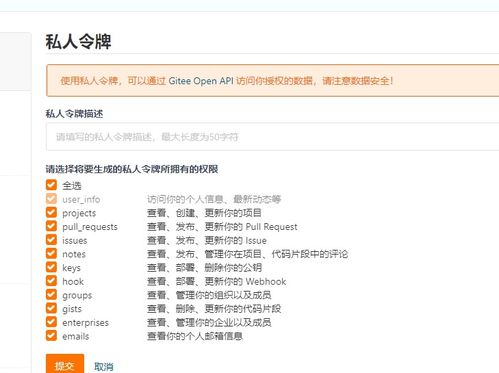
- 生成私人令牌:
- 进入【设置】→【安全设置】→【私人令牌】
- 勾选
projects权限
- 保存生成的token(仅显示一次)
2.2 PicGo客户端配置
1. 下载安装PicGo(支持Windows/macOS/Linux)
2. 安装Gitee插件:
`
PicGo设置 → 插件设置 → 搜索gitee-uploader
`
3. 图床配置:
`json
{
"repo": "用户名/仓库名",
"branch": "master",
"token": "你的私人令牌",
"path": "img/",
"customUrl": "https://gitee.com/用户名/仓库名/raw/master"
}
`
2.3 Typora集成设置
- 打开Typora → 【文件】→【偏好设置】
- 图像配置:
- 上传服务:PicGo(app)
- PicGo路径:选择本地PicGo安装位置
- 验证上传:点击「验证图片上传选项」
- 开启自动上传:勾选【对本地位置的图片应用上述规则】
三、域名代理服务部署
3.1 为什么需要代理?
Gitee原始链接存在:
- 国内访问速度波动
- 仓库公开性限制
- 缺乏自定义CDN加速
3.2 代理方案选择
方案A:CloudFlare Workers代理(推荐)`javascript
// worker.js 代码示例
addEventListener('fetch', event => {
event.respondWith(handleRequest(event.request))
})
async function handleRequest(request) {
const url = new URL(request.url)
const giteeUrl = https://gitee.com/你的用户名/仓库名/raw/master${url.pathname}
return fetch(giteeUrl, {
headers: {
'User-Agent': 'Mozilla/5.0'
}
})
}`
方案B:Nginx反向代理`nginx
server {
listen 80;
servername img.yourdomain.com;
location / {
proxypass https://gitee.com/你的用户名/仓库名/raw/master/;
proxysetheader Referer "https://gitee.com";
proxysslserver_name on;
}
}`
3.3 域名配置步骤
- 注册域名(阿里云/腾讯云等)
- 添加CNAME记录指向代理服务地址
- 在PicGo中更新customUrl为你的代理域名
四、高级优化技巧
4.1 图片压缩优化
- 在PicGo中安装picgo-plugin-compress插件
- 配置自动压缩参数:
`
最大宽度:1920px
质量:85%
保留EXIF信息:否
`
4.2 批量迁移工具
对于已有文档的图片迁移:`python
# Python脚本示例
import re
import requests
from pathlib import Path
def replaceimagelinks(mdfile):
with open(mdfile, 'r', encoding='utf-8') as f:
content = f.read()
# 匹配本地图片链接并替换
pattern = r'!\[.?\]\((.?\.(?:jpg|png|gif))\)'
# 此处添加你的上传逻辑
`
4.3 监控与备份策略
- 设置Gitee仓库的Webhook,自动备份到GitHub
- 使用脚本定期检查图片可访问性
- 重要图片保留本地副本
五、常见问题排查
Q1:上传失败提示"404错误"
- 检查仓库是否设为公开
- 确认token权限是否足够
- 验证仓库路径是否正确
Q2:代理服务图片无法加载
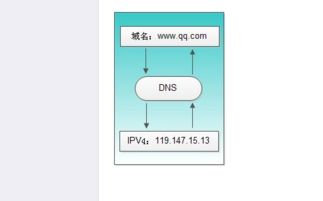
- 检查域名解析是否生效
- 确认代理脚本无语法错误
- 测试直接访问Gitee原始链接
Q3:Typora上传后链接格式错误
- 检查PicGo的customUrl配置
- 重启Typora和PicGo
- 更新PicGo到最新版本
六、安全注意事项
- 令牌安全:
- 不要将token提交到公开仓库
- 定期更新私人令牌
- 使用环境变量存储敏感信息
- 内容审查:
- Gitee禁止存储违规内容
- 建议建立图片审核机制
- 重要图片加密存储
- 访问控制:
- 代理服务添加访问频率限制
- 配置合适的缓存策略
- 启用HTTPS加密传输
七、
通过Typora+PicGo+Gitee+域名代理的组合方案,我们成功构建了一个稳定、高效、可控的图文工作流。这套方案不仅解决了Markdown写作中的图片管理痛点,还通过自定义代理服务提升了访问体验和可控性。随着需求的增长,可进一步扩展为多CDN分发、智能压缩等高级功能,打造专属的云端图文管理系统。
提示:技术方案需要根据实际使用场景调整,建议先在测试环境验证完整流程。
如若转载,请注明出处:http://www.dianditaoquan.com/product/74.html
更新时间:2026-03-27 07:12:01